 ElvenFlow
Threads Analytics
Threads analytics that show what grows your audience
Threads analytics are the numbers behind your account: views, likes, replies, reposts, quotes, engagement rate, and followers. ElvenFlow keeps them in one place, saves your follower count every day, and shows you which posts are worth doing again.
The short answer
- ElvenFlow tracks followers, views, and engagement rate for your account, plus views, likes, replies, reposts, quotes, and engagement rate for every post.
- Your follower count is saved once a day, starting the day you connect.
- Engagement rate is likes, replies, reposts, and quotes, divided by views.
- There is no universal benchmark rate. Compare yours with your own recent average, and with your top-quarter posts, which ElvenFlow highlights in your posts table.
- Our study of 22,799 top posts has no view counts, so it gives no rate. The typical top post earned 81 to 92 likes, replies, reposts, and quotes in total.
What can you track with Threads analytics?
In ElvenFlow you can track three numbers for your account, your followers, views, and engagement rate, plus the full stats for every post you publish.
Your account
- Followers, and how much the count moved over the range
- Views, with the change against the period before
- Engagement rate, with the same comparison
Every post
- Views, likes, replies, reposts, and quotes
- Engagement rate for each post
- Link clicks on your Auto-Plug replies
Your patterns
- Best posting times for each day, by views and by engagement
- A map of how often you posted over the past year
- Charts by day, week, or month
Pick a range from 7 days to a year, step back through earlier periods, and download any chart or your posts table as a CSV file.
Top posts
How do you find your best Threads posts?
Open the posts table and sort by any column. ElvenFlow marks the top post in each column and the posts in the top quarter, so your winners stand out at a glance.
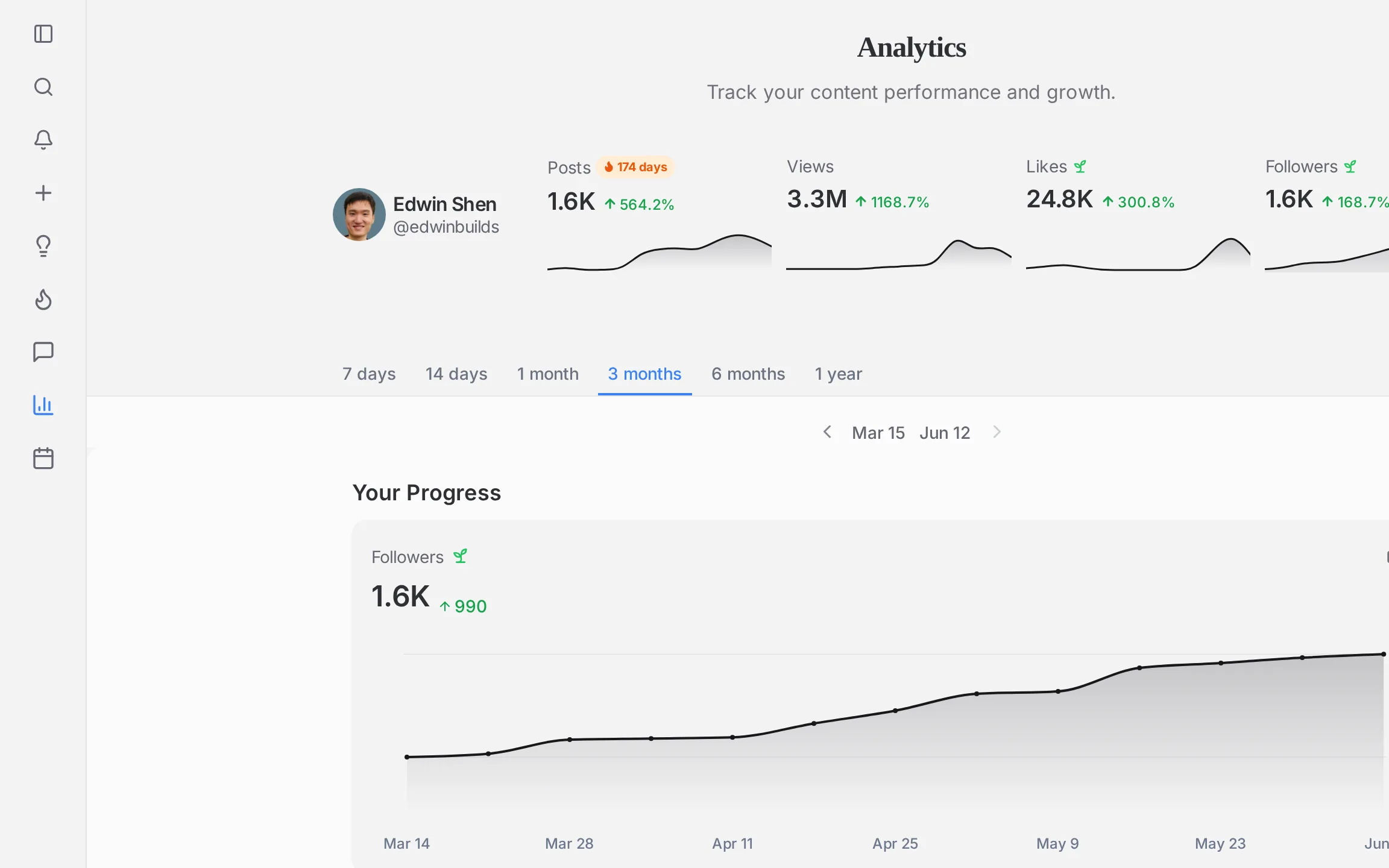
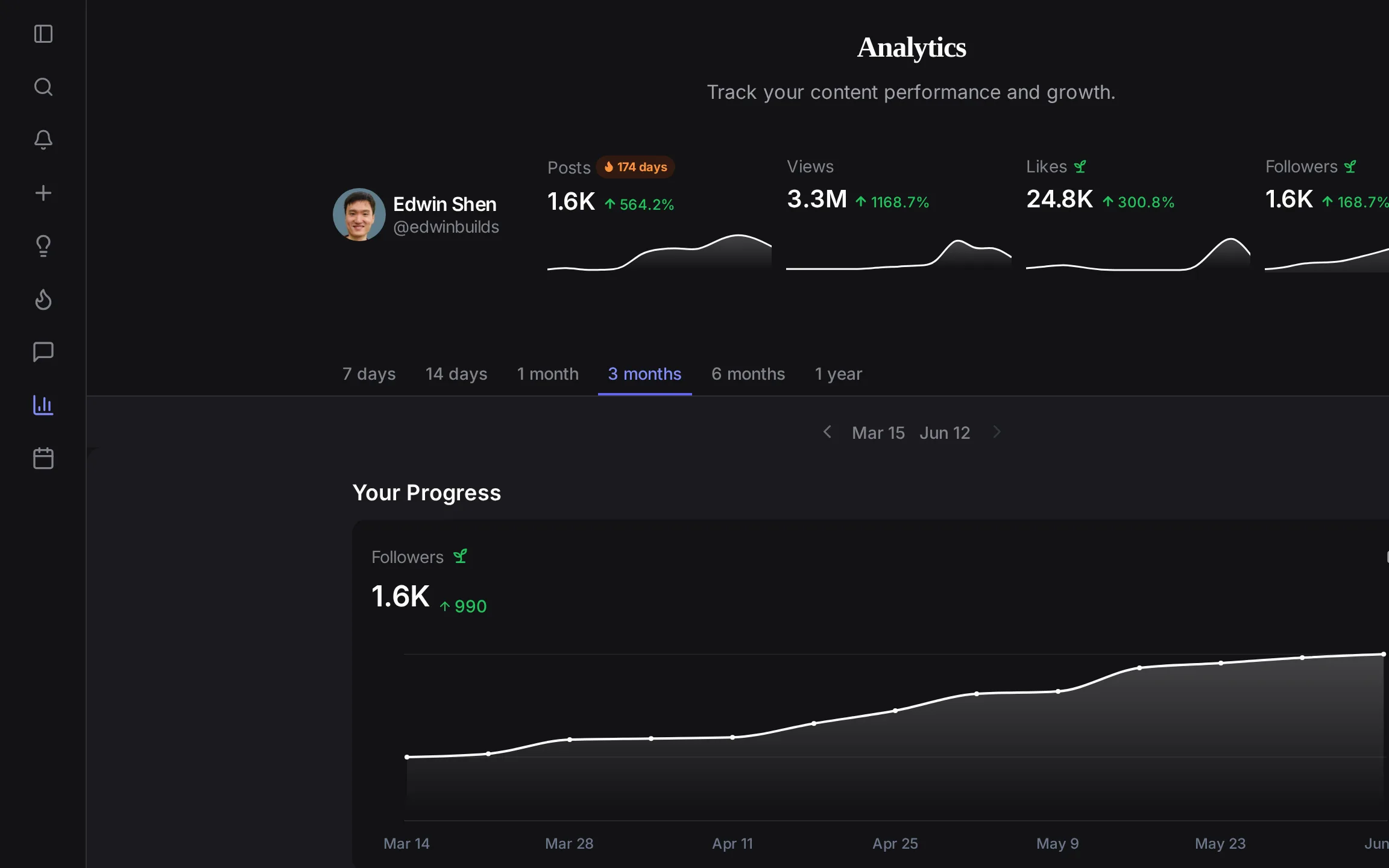
How do you track your Threads follower growth over time?
Connect your Threads account and ElvenFlow saves your follower count once a day. Your follower chart starts on the day you connect, and every day after that adds a point.
The Followers card shows your count now and how much it moved over the range you picked. On longer ranges, switch to weekly or monthly to see the trend instead of the daily ups and downs.
Your posts work differently. When you connect, ElvenFlow brings in your past posts with their numbers, so your posts table is full from the start.
One thing to know: ElvenFlow tracks how many people follow you, not a list of who they are.
How do you read your Threads analytics?
Read them as a trend, not a snapshot. One post or one day tells you little. What matters is whether your views and engagement rate are higher this period than the last, and which posts keep rising to the top.
- 1. Start with views. They show how far your posts travel. If they climb, your reach is growing.
- 2. Then check engagement rate. It shows whether the people who saw your posts did something about them.
- 3. Then sort your posts. Look at your top five by views and by replies. Note what they share: the topic, the first line, the length, the format.
- 4. Then look at followers. Line the chart up with your top posts and see which ones came right before a jump.
- 5. Last, check your best posting times. Move your queue slots toward the hours that work for you.
What counts as good engagement on Threads?
Good engagement is engagement that beats your own recent average. There is no single rate everyone should hit, because accounts differ in size and niche, so compare yourself with last month first.
ElvenFlow works out engagement rate as likes, replies, reposts, and quotes, divided by views, times 100. It does this for your whole account and for every post.
For a sense of what strong looks like, use our study of 22,799 top posts from 13,940 creators. The typical post in it earned between 81 and 92 likes, replies, reposts, and quotes, depending on the day of the week. The hour mattered more: about 51 at 3 AM ET against 118 at 2 PM ET.
These are already strong posts, so treat them as a bar to aim for, not an average. When one of yours clears it, write more like it. To plan when to post, see our study of the best time to post on Threads.
What does each Threads metric tell you?
Each metric answers a different question. Here is what each one means and what to do when it moves.
| Metric | What it means | What to do about it |
|---|---|---|
| Followers | How many people follow you, saved once a day. | If it stalls, find the posts that came before your last jump and make more like them. |
| Views | How many times your posts were seen in the range. | If views drop, post more often and move your slots to your best times. |
| Engagement rate | Likes, replies, reposts, and quotes, divided by views. | If it falls while views rise, your posts are reaching new people. Give them a reason to reply, like a clear opinion. |
| Likes | Quick approval from people who saw the post. | Use your most-liked posts as a guide to the topics people want. |
| Replies | People who cared enough to write back. | Answer them. Your reply keeps the conversation going. |
| Reposts | People sharing your post with their own followers. | Find what your most-reposted posts have in common and do it again. |
| Quotes | Reposts with the sharer's own comment on top. | Read what they wrote. It shows how people describe your idea. |
| Link clicks | Clicks from real people on the links in your Auto-Plug replies. | If a post has lots of views and few clicks, rewrite the reply that carries the link. |
| Best posting times | Your average views and engagement for each hour of each day. | Fill your queue with your strongest hours. |
What is the best Threads analytics tool?
The best Threads analytics tool keeps your history, puts every post's numbers side by side, and helps you act on them. ElvenFlow does all three, and feeds your best times straight into your posting schedule.
Other tools cover parts of this. BlackTwist shows follower growth, views, engagement rate, and your best posting time on its paid plans. Typefully's analytics cover Threads followers, impressions, and engagement rate. Buffer has a Threads insights dashboard, though its own docs say its best time to post feature is not available for Threads.
What ElvenFlow adds is what happens next. Your best times fill your queue, your top posts can go out again with Evergreen, and you can ask Claude about your numbers through ElvenFlow's MCP server. See more tools side by side in our guide to the best Threads tools.
How do you turn your Threads analytics into growth?
Use your numbers to decide three things: when to post, what to post again, and what to write next.
- When to post. Fill your queue from your best times, then let the Threads scheduler post for you.
- What to post again. Put your top posts on Evergreen so they go out again as fresh posts weeks or months later.
- What to write next. Open your top posts, find the pattern, and write the next one in the same shape. Our guide on how to grow on Threads covers the rest.
- Ask about it. Connect Claude or another MCP assistant and ask how your week went. It can pull your totals, how they changed, and your top posts from ElvenFlow.
Common questions
Track your Threads growth today
Connect your account and your follower chart starts today, with your past posts and their numbers already in.